A soft 404 means Google interprets a URL as an error or empty page even though the server has not returned the appropriate missing-page response. Check what the URL should contain, what it actually returns and what Google can render before choosing a fix.
You open a page and it appears to work. Search Console, however, lists it under “Soft 404”. The heading is there, the navigation works and the address looks right. It is tempting to add a few paragraphs, submit the URL again and hope the warning disappears.
That approach can miss the cause. A product’s details may have failed to load. A deleted article may still return a successful response. A redirect may take every missing URL to the homepage. Each situation needs a different decision.
The purpose of this review is to make useful content available and handle missing content properly. Clearing the report is only useful when the resulting page behaviour makes sense.

What is a soft 404 error?
An HTTP status code tells a browser or crawler how the server handled a request. A 200 OK response indicates success. A 404 Not Found response indicates that the requested resource could not be found. The visible design of the page does not determine that response.
With a soft 404, those signals do not agree. The server may return 200 OK, while the page shows an error message or has no main content. As Google’s crawling guidance explains, its systems can interpret that output as an error and exclude the page from Search.
“Soft 404” is a classification, rather than an HTTP status code you configure. It can also arise from an unsuitable redirect. Inspecting the response is necessary, but a successful status alone cannot establish that the page is useful or indexable.
How does a soft 404 differ from a real 404 or 410?
| Situation | What it communicates | What to check |
|---|---|---|
| Soft 404 | The response and the apparent state of the content disagree. | Whether the intended content exists and is being served correctly. |
| 404 Not Found | The requested resource cannot be found. | Whether it should be restored, has moved, or is correctly unavailable. |
| 410 Gone | The resource has been intentionally removed. | Whether permanent removal accurately describes the situation. |
A real 404 can be the correct outcome. If an obsolete page has no useful replacement, there is no need to invent one just to keep the URL returning 200. Google’s HTTP status documentation describes how it handles both 404 and 410 responses. Choosing 410 should reflect the resource’s state; it is not a promise of faster removal.
Nor does a short page automatically have a soft 404 problem. A concise answer may fully serve its purpose. Check the actual classification and rendered content rather than treating a word count as a diagnostic threshold.
Inspect the page before changing it
Start with one representative URL. If a large group is affected, choose examples from different page types rather than making the same change across all of them.
Read the recorded status in Search Console
Open the Page indexing report, select Soft 404 and inspect an example URL. Record the reported reason and last crawl date. A problem seen before your latest deployment may describe an older version of the page.
Older tutorials may refer to the Coverage report or the message “Submitted URL seems to be a Soft 404”. That wording is still useful when searching for explanations, but use the current Page indexing report guidance to navigate the issue.
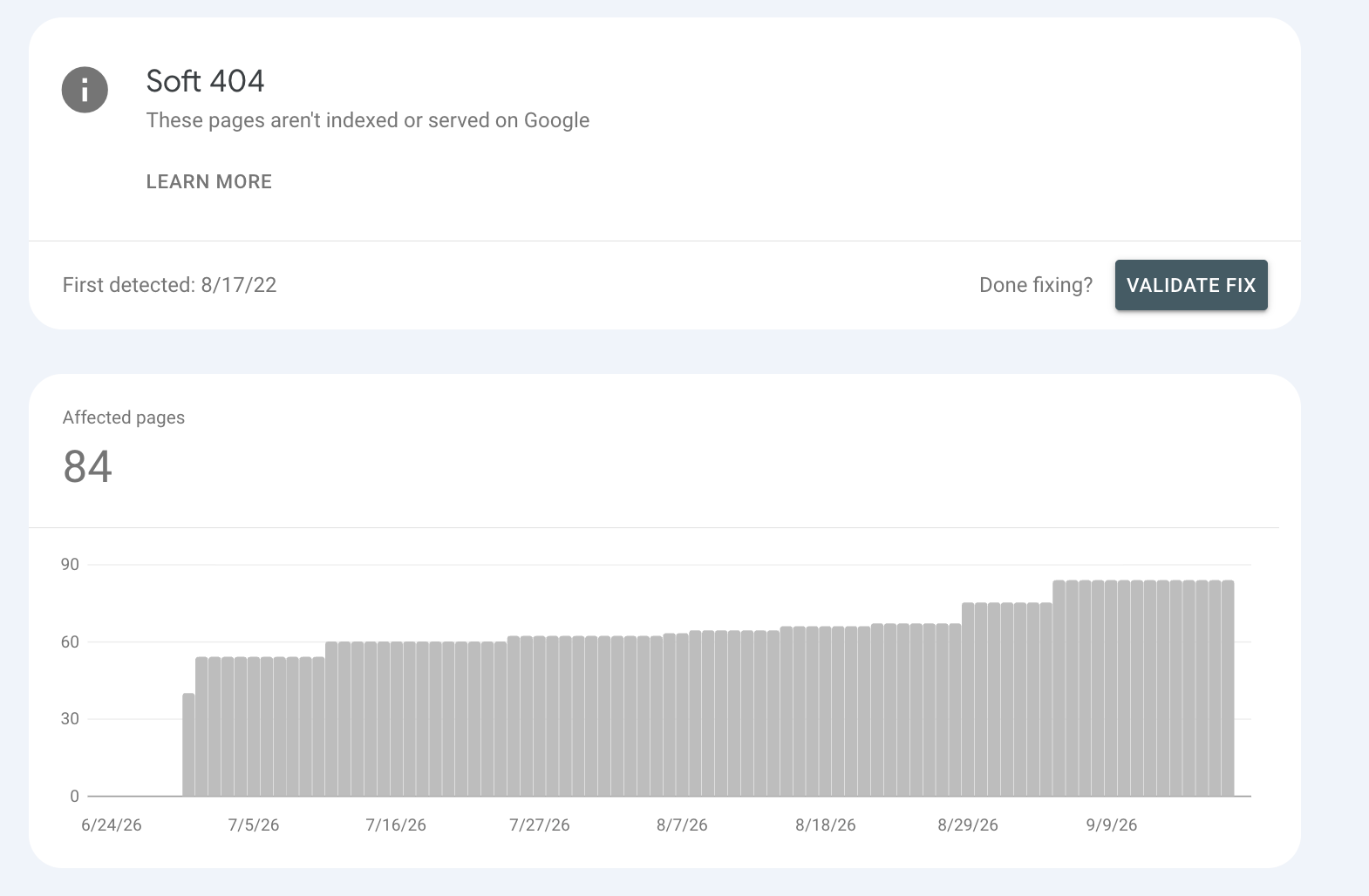
In this example, the Soft 404 heading identifies the classification, and the message beneath it confirms that these pages are not indexed or served on Google. The chart tracks the number of affected pages over time. It is not a traffic chart, and the First detected date should not be read as the date every affected URL began failing.
Scroll down to the report’s example URLs, which are outside this screenshot, and open a representative URL in URL Inspection. Check whether it belongs in search before deciding what to change. The Validate fix button is for checking completed repairs; it does not repair the pages itself.
Check the response and destination
In your browser’s developer tools, open the Network panel and reload the page. Inspect the main document request, its status and any redirects. Keep the document response separate from responses for images, scripts and data requests.
If you are working with a developer, ask them to check a full GET request and its redirect chain. A header-only check can be a useful starting point, but it does not show the content that was returned. Record the final destination as well as the original URL.
Why does the page work in my browser?
Your browser may have a signed-in session, cached data or resources that loaded successfully on this visit. That does not establish what Google received when it crawled the URL.
Run Test live URL, then use View tested page to inspect the rendered screenshot, HTML and resource information. Google’s URL Inspection documentation distinguishes this current test from the recorded index information. Compare the main content, not just the logo and navigation.
A useful handoff contains the exact URL, intended content, observed response, rendered result and test time. That gives a developer something reproducible to investigate instead of the instruction “fix the SEO error”.
Choose the fix that matches the page
Before changing status codes or copy, decide what a visitor should find at this address. The following table turns that decision into a practical next step.
| Intended page state | Appropriate action | Evidence to check afterwards |
|---|---|---|
| Useful page, broken or missing main content | Repair content delivery and retain a successful response. | The intended information appears in the rendered page. |
| Content moved to an equivalent page | Use a direct permanent redirect to that replacement. | The destination works and answers the original need. |
| Content removed, no equivalent replacement | Return a real 404 or 410. | The missing URL returns that status, even with a helpful custom page. |
| Temporary server or service failure | Repair the failure and use appropriate server-error handling while unavailable. | Normal content and responses resume after recovery. |
Keep and repair a page that still has a job to do
If the information should still be available, identify why it is missing. Recover accidentally removed content, repair a failed data request or correct a template that displays an error. Add explanatory content when the page genuinely needs it, rather than padding a broken template with generic paragraphs.
Redirect only when there is a useful replacement
A permanent redirect fits content that has moved or been consolidated into a page serving the same need. A replacement buying guide may be suitable for an older version of that guide. A general homepage usually cannot fulfil the same task.
Google’s site-move guidance warns against redirecting many old URLs to an irrelevant destination, which may be treated as a soft 404. Review the destination’s substance as carefully as the redirect code. Your keyword and page mapping can help identify which page should own the topic.
Let removed pages return an honest missing-page response
A custom error page can retain your navigation and suggest useful places to visit. Its design should help the visitor recover from a dead end, while the missing URL returns the appropriate status. A friendly “page not found” message served with 200 leaves the underlying problem unresolved.
Update internal links and remove the retired URL from the sitemap. These changes keep your own navigation and discovery signals consistent with the removal.
What about empty categories and unavailable products?
Availability alone does not settle the decision. A temporarily unavailable product may still need specifications, compatibility information, support resources or an accurate restock message. Retaining that useful page can make sense.
An empty category with no products and no useful guidance needs a different assessment. Decide whether it has a continuing purpose, whether it should be discoverable in search and what information would help its visitors. A permanently discontinued item with a clear successor is different again. Avoid applying one blanket rule to every product or category URL.
Look beyond the copy when rendering fails
A page can return its header, footer and layout successfully while failing to load the information between them. Google identifies missing JavaScript resources and database problems among the possible causes of soft 404 output. In that situation, rewriting the introduction will not restore the missing product or article.
Compare the affected page with a working page using the same template. Check whether a content request fails, a script is unavailable or the application falls back to an error state. If several URLs fail in the same way, repair the shared cause and verify examples across the affected group.
What changes in a JavaScript application?
Client-side routing can make error handling less straightforward. The server may deliver the same application shell for both valid and invalid addresses, with JavaScript deciding what to show afterwards.
Where meaningful HTTP status control is impractical, Google’s JavaScript SEO guidance describes two options for genuine error pages: redirect to a URL that returns a server-side 404, or add a noindex directive to the error state. This is a specific application-handling case. Adding noindex to a valuable page would remove it from search eligibility rather than repair its content.
For a WordPress site, ask which part of the stack owns the response: the theme, a redirect plugin, the hosting configuration or a content integration. Test the behaviour before disabling components or changing settings. “Soft 404 WordPress” describes a symptom, not one universal plugin fix.
A worked example: the product exists, but its details do not load

Imagine a product page that returns 200. The product is still sold, but a failed content request leaves only the site navigation and an “Item unavailable” message. Adding more general text about the shop might make the page longer while leaving customers unable to assess the product.
| Check | Finding in this example | Decision |
|---|---|---|
| Intended resource | A current product with valid information. | Keep the URL. |
| Document response | 200; no redirect. | Inspect the content as well as the status. |
| Rendered main content | Product details absent; error message visible. | Investigate the request supplying those details. |
| Underlying fault | The template handles a failed request as a missing product. | Repair the request and distinguish failure from removal. |
| Verification after repair | Check that product details render and the intended action works. | Then review Google’s subsequent indexing information. |
Now consider an old event page whose information has been deliberately removed, with no useful replacement. A genuine 404 or 410 may be the correct outcome. The objective is different from the product example, so successful verification should look different too.
Verify the result in Search Console
After making a change, check the live URL again. Confirm its response, destination and rendered content. For a retained page, test the action it is supposed to support. For a redirect, inspect the replacement separately. For a removed resource, verify the error status.
Then compare the new evidence with the recorded Search Console result. A passing live test does not guarantee that the page has entered the index, and it does not predict a ranking.
Why is the report still showing the error?
The report may still reflect an earlier crawl. Check dates before making another change. Once the relevant instances are fixed, use Validate fix in the issue report to ask Google to check them. Google can also detect repairs during normal crawling.
Validation concerns that particular issue. A URL that has become unavailable can be recorded as resolved without becoming indexed, as the validation documentation explains. That may be appropriate for a removed page, but it would not meet the objective for a current service page.
Keep the acceptance criteria specific: the retained page delivers its content; the redirect reaches the right replacement; the removed resource returns the intended status. Follow up on indexing separately where the page is meant to appear in search.
Not every Soft 404 needs immediate action
In my experience, the useful question is not how many URLs appear in the report, but what would be lost if each page stayed out of search. Strange parameters, old filter paths, internal search pages, test URLs and a few obsolete pages can be low priority when they have no useful content, traffic, valuable links or customer purpose.
There are two qualifications. A never-existing URL can usually be left alone when it returns a genuine 404, as Google’s 404 guidance explains; that does not make a nonexistent page returning 200 correct. And empty search or filter combinations generated at scale deserve attention because they can create unnecessary crawling. Google recommends a 404 for filter combinations with no results in its faceted navigation guidance.
For a handful of retired pages without a replacement, traffic or valuable links, I would usually schedule cleanup behind current pages that matter to customers. A genuine 404 or 410 is still the right response; “low priority” is a decision about timing. Where a valid page should serve visitors but stay out of search, use an intentional indexing policy such as a crawlable noindex directive.

Decide what matters first
A report containing many affected URLs can make every row look equally urgent. Use the URL’s intended role, discovery signals and scale to decide what to do first. This is the same judgement needed when prioritising an SEO audit.
| Situation | Priority | Recommended action |
|---|---|---|
| The URL should rank, is in the sitemap or has useful internal links or backlinks | High | Inspect and repair the page, redirect it to an equivalent replacement, or restore the correct 404/410 response. |
| The page has relevant traffic or supports an important customer task | High | Check the rendered content and template or data dependencies before changing the URL. |
| An empty filter or internal search URL has no content and is generated at scale | Review promptly | Stop unnecessary URL generation or discovery and return 404 for no-result combinations where appropriate. |
| Google discovered a URL that never existed and it returns a genuine 404 | Usually low | Leave it alone unless it is a common misspelling, an accidental internal link or a submitted URL. |
| A few retired URLs have no replacement, traffic or valuable links | Usually low | Let them return 404 or 410 and remove obsolete internal links and sitemap entries when convenient. |
| The number of Soft 404s rises suddenly across a template | High | Investigate the shared release, routing, data or rendering change before reviewing individual URLs. |
“Low” describes sequencing, not permission to serve a nonexistent page as 200. Keep a short record of the page type, intended outcome, observed fault and verification evidence. Soft 404 work is complete when the response and rendered experience match the page’s intended state, with indexing reviewed where the page is meant to appear.
Find out why important pages are missing
Review the affected URLs, identify the underlying cause and plan technical fixes around the pages your customers need.
Explore technical SEO support