Agentic web architecture makes a website easier for AI agents to read and use. Start with clear pages and accurate information. Add a reading guide, API or agent tool when a real task requires it. Reusable instructions can guide the work, and a separate agent can handle a specialist task. The right setup depends on what visitors need to accomplish and what their agents support.
Overview: six capabilities an agent may need
A customer asks an AI agent to find a product that can arrive by Friday. Reading the product page is only the beginning: the agent must check stock, calculate delivery and explain the price and conditions. The website needs to make those facts available and give the agent a reliable way to check anything that changes.
That is the problem behind agentic web architecture: how a website can help an agent move from reading information to completing a task. It brings together familiar web foundations, such as HTML and APIs, with newer ways to describe tools and connect agents. No single standard covers the whole process, and most websites will need only some of the capabilities below.
| Capability | Question and example | Related formats, interfaces and controls |
|---|---|---|
| 01 Readable | Can the agent access and extract the content?Example: An article has meaningful headings and text available in HTML. | Semantic HTML |
| 02 Understandable | Can it tell what the facts mean?Example: A product page identifies the item and its current offer. | JSON-LD and Schema.org |
| 03 Discoverable | Can it find useful content or machine-facing resources?Example: It finds the current returns policy or a shipping service. | robots.txtsitemap.xmlllms.txtARD |
| 04 Callable | Can it invoke an operation with defined inputs and outputs?Example: A shipping request accepts a destination and package size, then returns a quote. | OpenAPIWebMCPMCP |
| 05 Actionable | Can it complete the task, handle errors and respect permissions?Example: An availability check returns a result or a useful error without changing the account. | Agent SkillsPermissions and confirmation |
| 06 Collaborative | Can another agent perform a bounded part of the work?Example: A specialist travel agent returns a delegated itinerary. | A2A |
Choose the capabilities your visitors need. The linked technologies support different parts of a task; robots.txt and sitemap.xml, for example, serve different purposes: crawl control and URL discovery. Neither exposes agent tools.
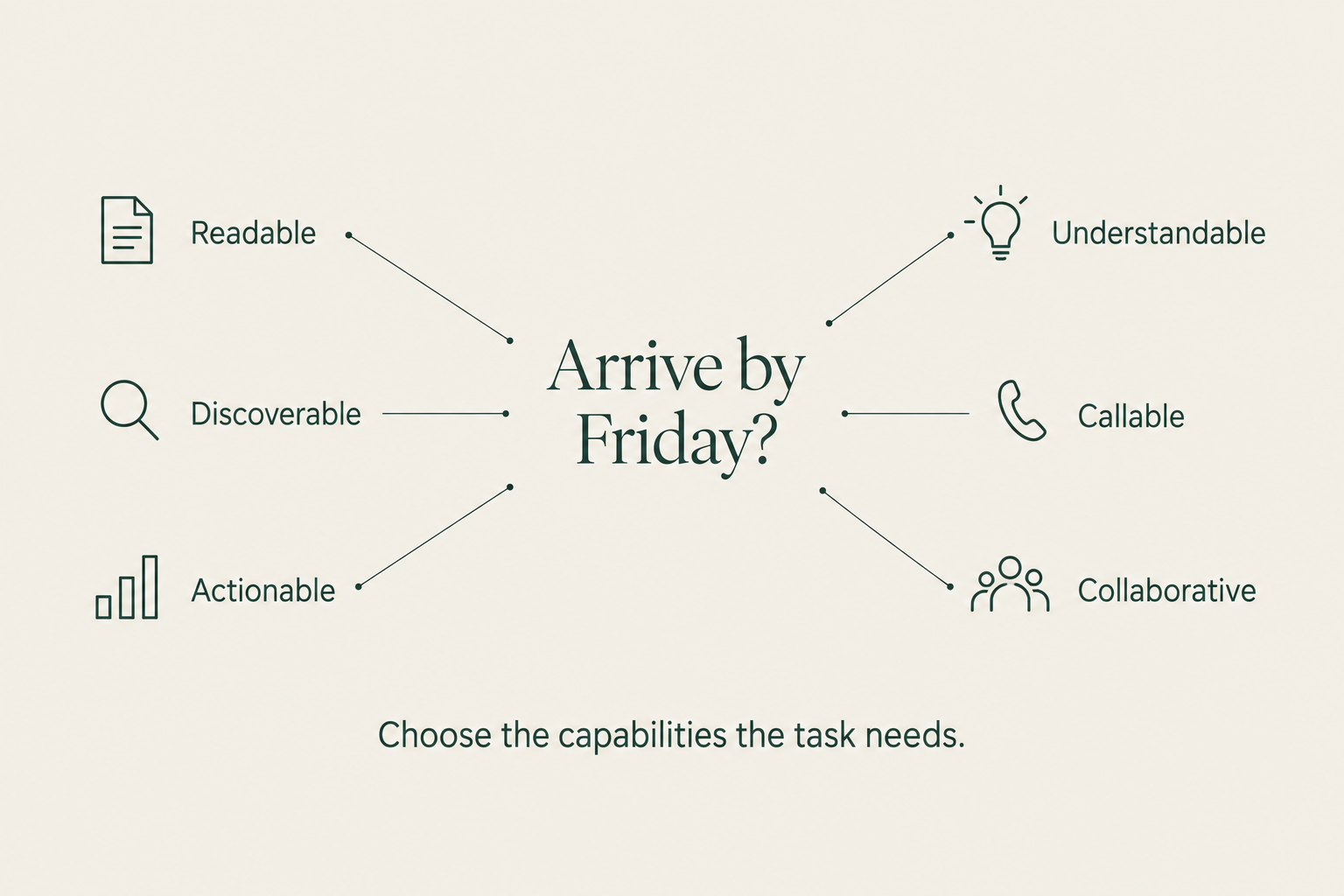
People browse a site, interpret its controls and decide what to do next. Search crawlers primarily fetch pages for an index. An agent may be asked to carry a task across several steps: locate a policy, compare options, check a live price and report back. Each step creates a different requirement for the site. A page that answers a question may need no agent-specific interface; a live calculation needs a reliable operation.
Working through these questions helps identify where a task breaks down. If an agent cannot reach a delivery policy, a tool catalog will not repair the missing information. If it can read a stock figure but needs today's availability, static content may be insufficient. If an operation can change an account, clear inputs alone are insufficient without authority, confirmation and a useful result.
Each technology addresses a different part of the work. Semantic HTML and structured data clarify pages. llms.txt can guide reading; ARD can help agents discover and search for resources. OpenAPI, WebMCP and MCP address different ways to expose operations. Agent Skills describe a method, while A2A concerns work between independently operated agents. Support varies between clients and browsers, so choose an interface for the environment in which the agent will actually work.
Readable: make the content easy to access
Start with the structure of the page. A clearly marked main region, logical headings, descriptive links, labelled fields and real buttons make a page easier for people, assistive technology and browser agents to interpret. An agent should be able to reach important policies, prices and specifications without working through an unreliable sequence of clicks. Server-rendered content can help, but a client application can also work if its facts and controls are available when needed.
Consider an availability form. “Check” may be clear to someone looking at the screen, yet an agent still needs to identify the date fields, the submit action and the result. A labelled form and a clear result region reduce that guesswork.

A browser agent may work through a poorly labelled interface, but each unclear field or hidden result adds guesswork. The same labels and relationships also help keyboard users and automated tests. Accessibility compliance alone does not prove an agent can complete a particular task.
A useful first test is to inspect a representative page's HTML, use its main form with a keyboard and identify facts hidden behind interactions. If the task fails here, a new protocol is unlikely to repair it.
Understandable: help agents interpret the facts
Once an agent can read the content, structured data can help identify what the page describes. Schema.org vocabulary in JSON-LD may identify an Article, Product, Organization or other relevant entity and connect it to properties such as an author or offer. The markup must agree with the current information visible on the page.
Google's structured-data guidance explains its use in Search, but does not promise that every independent agent will use the same properties. JSON-LD describes meaning; it does not turn a page into an executable service.
A product name in a heading tells the reader what they are looking at. JSON-LD can make the relationship explicit: this is a Product, and this is its offer. If the visible price changes while the markup stays the same, that extra description becomes a source of confusion. Keep both connected to the same maintained facts.
For a publisher or professional-services site, this may be the right stopping point. Clear pages, authorship, crawl access and accurate structured data can make the information usable without a callable tool. A retailer or software platform may need more because its important answers depend on changing data or a transaction.
Discoverable: help agents find content and services
robots.txt and sitemap.xml: crawl control and URL discovery
robots.txt tells cooperating crawlers which URLs they may fetch. A sitemap lists URLs for discovery, and its location can be declared in robots.txt. Neither file describes an agent tool. Crawl rules do not secure private content or guarantee that a URL stays out of search results. An agent that finds a URL still needs to read the page and work out what it can do there.
llms.txt points agents toward selected content
The llms.txt proposal gives a site a curated Markdown guide to selected content, usually at /llms.txt or a relevant subpath. Its August 2026 version 2 also recommends clean Markdown alternatives for individual pages and links that connect them to the guide. A documentation site might point to its quick start, API reference and current policies. The value comes from accurate selection and maintained links, not from exporting every URL.
The file works like a short guide to the most useful pages. A visitor to a large documentation site may otherwise have to navigate a menu, several versions and unrelated navigation and interface text before finding the current answer. A short guide can name the authoritative pages and explain what each contains. Markdown alternatives can offer a cleaner version of a page, although they add another copy that the publisher must keep aligned with the website.
# Example service

> Documentation and policies for Example service.

## Start here
- [API guide](https://example.com/docs/api.md): Operations and examples
- [Returns policy](https://example.com/policies/returns.md): Current terms
This is a community proposal, not a permission system or a guaranteed route into AI-search answers. Google says its generative Search features do not use llms.txt. Test the file for the particular agent-reading task you intend to support.
A useful test is to give an agent the guide as its starting point and ask it to find the latest policy or API detail. Did it select the correct resource? Did the Markdown version agree with the current page? A small site with a few clear pages may gain little from an extra file, while a documentation-heavy site can test whether the guide shortens the path to the right source.

ARD helps agents discover and search for resources
Agentic Resource Discovery (ARD) proposes a way to describe resources and make them searchable across publishers, including APIs, MCP servers, Agent Skills and A2A agents. The 26 August 2026 v0.91 proposal uses /.well-known/ard.json and also describes in-page JSON-LD and rel="ard" discovery. Its predecessor used /.well-known/ai-catalog.json; compatible clients may also support that older path.
An ARD entry can point to a resource’s own definition and add search signals, such as example questions it can answer. Publishing the entry does not authenticate a client or make the resource callable. A site needs a useful resource to describe before discovery adds value.
The distinction is between finding material to read and finding a capability to use. Imagine a public-data platform with a documented HTTP API and a separate agent service. ARD could describe that those resources exist, what jobs they serve and where their own specifications or cards can be found. A registry could collect these entries so clients can search for resources from several publishers. The actual API or agent still needs to work, and a client still needs to decide whether to trust and access it.
ARD is most relevant once a team operates resources that other agents have a reason to discover. Because the proposal is evolving, an implementation should be checked against the current specification and tested with a client that is expected to use it. Discovery needs both a working resource to describe and a compatible client.
Callable: give agents a defined way to use a service
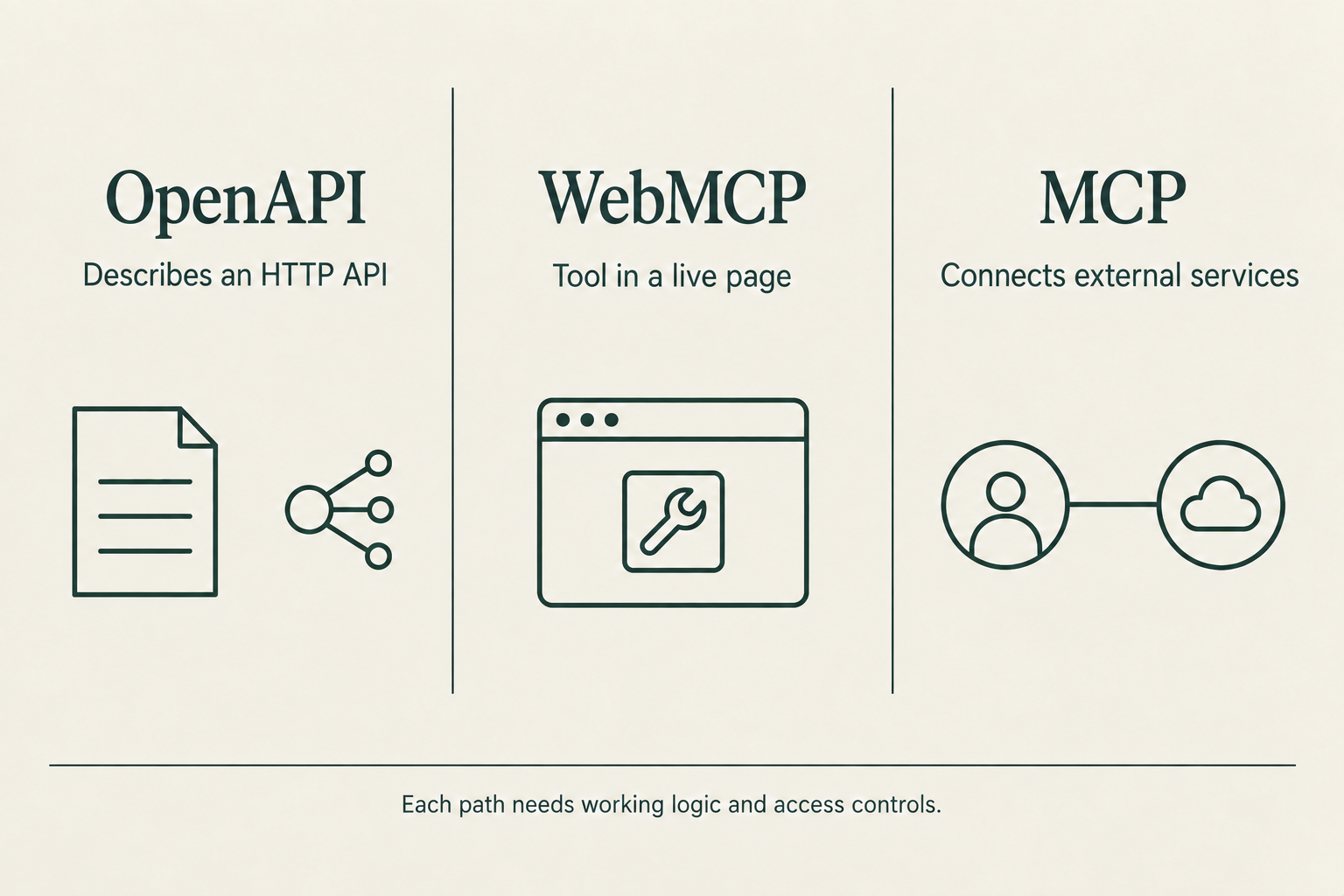
OpenAPI describes how to call an HTTP API
A shipping estimate is a useful example: it accepts a destination, package size and service level, then returns a price, currency, validity period or a clear error. The OpenAPI Specification, version 3.2.1 of 10 September 2026, can describe that HTTP API's operations, schemas and security requirements. It tells a client how to make a request and what response to expect. The server still has to check the request and enforce permissions.
An API is valuable when an operation has clear inputs, repeatable outputs and a use beyond one browser session: availability checks, product searches, calculations or reports. Its description helps a developer or compatible client understand how to call the API without inspecting the form’s network requests. The operation itself must handle unsupported destinations, stale data, rate limits where appropriate and authentication that matches the action. A description alone cannot make an unreliable service dependable.
WebMCP exposes tools in the live page
WebMCP proposes a way for a website to tell a compatible browser agent which tools it can use inside the open page. Chrome's documentation describes declarative annotations on HTML forms and an imperative JavaScript API for more involved actions. Its origin trial begins with Chrome 149, so browser support and API details should be checked before implementation. A page tool should say what it does, what input it needs and what state it changes; the site remains responsible for execution and user control.
Consider an agent helping someone use an availability checker already open in their browser. It can inspect fields, click a button and read the result, but changing labels or information hidden in the interface can make that sequence unreliable. A page tool could describe the check and its required fields explicitly while using the same underlying service and permission checks as the visible form. The tool should be relevant to the current page and state; a long catalog of unrelated actions would make selection harder.
WebMCP provides browser APIs inspired by MCP; it is not an implementation of the MCP protocol. Its page tools are available while the page is open. As an experimental browser proposal, it should be tested in a supported environment as an addition to the human interface. It is suited to a live-tab task with the person present. A site should still work for people and ordinary browser automation if a particular agent cannot use the proposed API.
MCP connects an AI application to an external service
Model Context Protocol (MCP) connects an AI application, whether browser-based or not, to a service offering tools, resources or prompts. The 28 July 2026 specification uses JSON-RPC and stateless protocol requests. That does not prevent a business workflow from carrying explicit state, such as a basket or task ID. Chrome's comparison distinguishes MCP's external integration from WebMCP's live-tab context.
For example, an SEO platform may offer a dashboard for people and an MCP server through which a compatible AI client can request a specific report or dataset. The user might never visit the website during that interaction. An MCP server is a running service with defined capabilities, not a metadata file placed at the root of the site. Each tool needs a clear purpose, access controls and useful error messages so the client can select it and understand the result.
| Interface | Where it fits | Choose it when |
|---|---|---|
| OpenAPI | A described HTTP API | An operation needs stable, structured inputs and outputs. |
| WebMCP | A tool in the live browser page | A compatible browser agent should use a selected page feature with the person present. |
| MCP | An external service connected to an AI application | An AI application needs authorised access to a service without relying on an open page. |
These interfaces can share underlying business logic, but none is a substitute for it. Start with a real task and specify the inputs, results and possible errors. A vague “submit” tool gives an agent little more than a vague button.
A business can support more than one path to the same function. Each additional path brings documentation, testing and permission work, so choose it for a client or task that needs it. There is no need to expose every button through all three.
Actionable: help agents complete the task reliably
A tool call is one step in a task. To finish the work, an agent may also need instructions, permission to act and a way to recover when something goes wrong.
Agent Skills explain how to carry out a task
An API may say “run a crawl”; it rarely explains how to judge the result. An Agent Skill packages a repeatable method, constraints and optional supporting files for a compatible agent. The Agent Skills specification requires a directory with a SKILL.md file whose YAML frontmatter includes a name and description.
A technical SEO skill might explain which templates to sample, how to distinguish expected exclusions from errors, and when to report uncertainty. It does not grant access to tools or guarantee that every client can discover or install it. The optional MCP Skills extension provides a way to discover and retrieve skills from a connected server. Its specification is final, while SDK and host support is still being implemented. The host controls how a skill is loaded.
Instructions are especially useful when a tool’s output still needs interpretation. A tool can return a list of excluded URLs; a maintained method can tell an agent which exclusions are expected, which need investigation, what evidence to collect and when to stop. Supporting references or scripts may be packaged alongside the instructions. The agent still uses only tools and permissions available in its environment, and the owner must keep the method current as the underlying service changes.
Putting SKILL.md at an arbitrary web address does not mean every agent will find, trust or run it. Installation, client support and environment requirements remain separate questions. A skill is most useful when a task recurs and its method is stable enough to document. If the process is unclear for the people doing it, writing a skill will expose that ambiguity rather than solve it automatically.
Set permissions and confirmation before exposing actions
Choose one user task and write down its inputs, acceptable result and failure cases. Reading a page and changing an account carry different risks. Before exposing an action, define whose permission it uses, what it can change and when a person must confirm the action. Validate input supplied by an agent on the server, return useful errors and record calls and outcomes without leaking sensitive data. The MCP specification's security guidance likewise emphasises user control, consent and appropriate access controls.
Separate reading from creating, editing, deleting, publishing, sending and purchasing. A quote can often be calculated without approval, but sending it to a customer is another action. An agent can prepare a cart, while payment requires the user or an authorised system to approve the actual terms. Tool descriptions should state costs, prerequisites and side effects clearly enough that the agent does not mistake a consequential action for a harmless lookup.
Keep a record that helps you investigate failures without exposing sensitive data:
- The action: which operation was called and when.
- The authority: whose permissions applied and whether confirmation was required.
- The outcome: what the service returned, whether it changed anything and whether the client retried.
These details help explain a wrong tool choice, a retry after a timeout or a mismatch between the result and what the person saw. A successful response from a tool is not necessarily a completed user task.
Measure whether the agent finds the right information, chooses the intended operation, supplies valid inputs and recovers from predictable failures. Record whether a person had to rescue the task. A shorter route that skips an important confirmation is not an improvement.
Collaborative: delegate work to another agent
A2A delegates work to another agent service
A2A addresses a narrower case: one independently operated agent asks another to perform a task. The Agent2Agent protocol, released at version 1.0.0, describes communication and task management. An Agent Card can describe the remote agent and its capabilities, with /.well-known/agent-card.json as one discovery route alongside registries or direct configuration.
The card does not authorise a purchase or expose private credentials. “Skills” named in an A2A card describe that agent's capabilities; they are distinct from the SKILL.md package format.
Imagine a travel-planning agent that receives a specific itinerary request from another service, asks for missing constraints and returns a result. The Agent Card can explain how to contact it and what it can do; it does not establish that the caller may spend money or access private bookings. The services still need to agree on access permissions and what the requested task allows.
Consider A2A when another agent needs to take responsibility for a bounded piece of work and return its status or result. If the requirement is simply to fetch data or run a calculation, a callable service may be enough.
Example: checking product availability and delivery
Suppose a customer asks an agent to find a product that can arrive by Friday, including the delivery cost. The site first needs readable product and policy pages, with current availability and delivery conditions that the agent can identify. Accurate structured data can identify the product and its offer, and must stay consistent with the information shown on the page.
The first failure might be simple: the delivery cutoff is buried in an image, or the product page has no clear link to the policy. The agent could answer confidently from an old page and still be wrong. Better HTML, a maintained policy URL and matching structured data address that problem before any new agent protocol is considered.

If the catalog and documentation are extensive, a curated llms.txt might help an agent locate the policy and API guide. A platform publishing several agent-facing services might use ARD to describe where those services are. Neither file can answer a live stock or shipping question on its own.
The next failure appears when the agent must estimate delivery for a specific postcode and quantity. A static policy can explain the rules but cannot necessarily calculate a current quote. A shipping tool could accept those inputs and return stock, shipping cost, currency, estimated date and an expiry or error. Its response should make the conditions visible to the person reviewing the answer.
A dependable stock or shipping operation could be described with OpenAPI. A compatible browser agent already on the product page might use a WebMCP page tool; an AI application could also connect through an MCP service. These interfaces can use the same underlying shipping API. The agent should receive a specific result or an intelligible error, then show the customer the price, timing and conditions. Adding an item to a cart is different from approving payment. A specialist delivery-planning agent would make A2A relevant only if the business actually operates one. Which route works depends on what the retailer provides and what the customer’s agent supports.
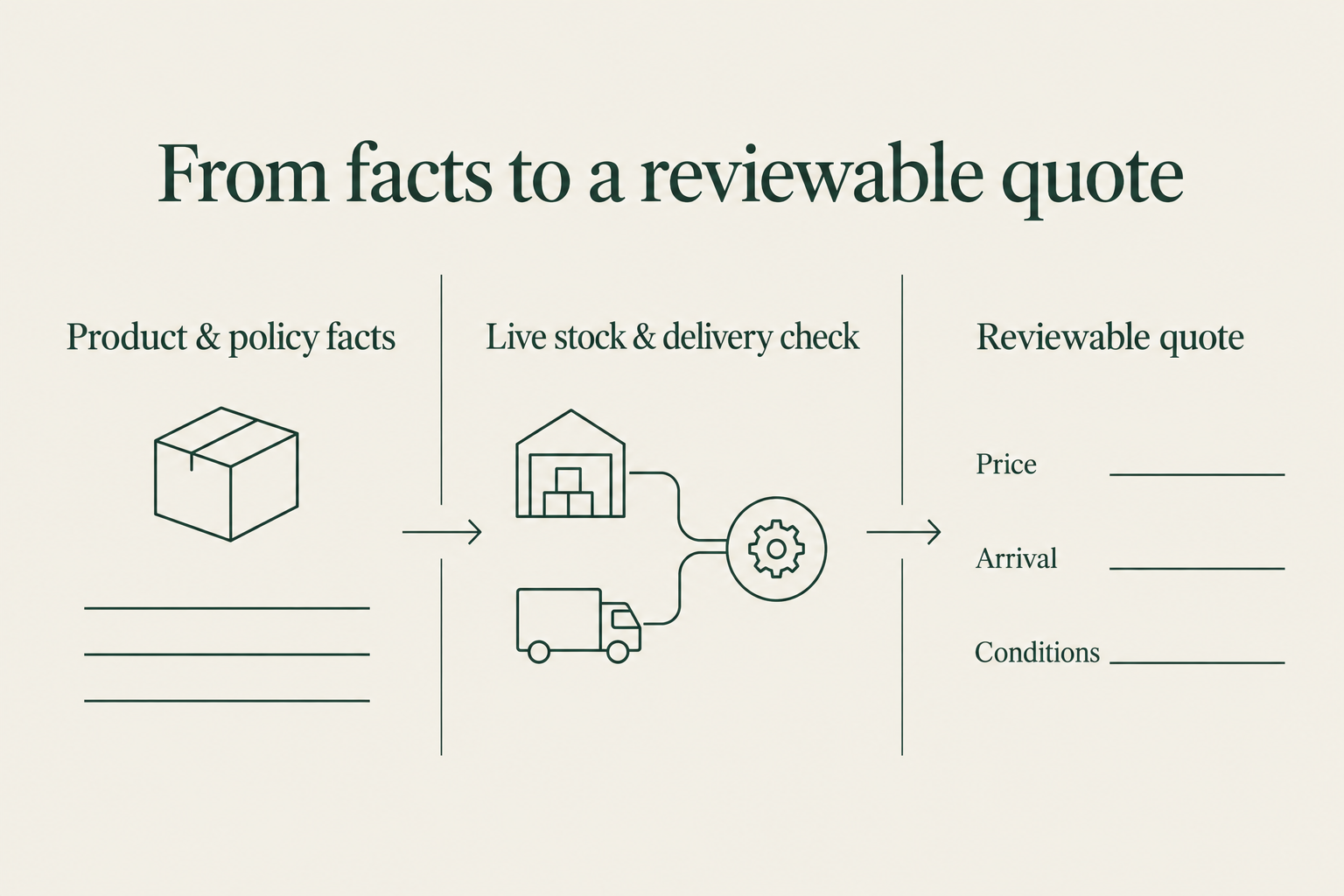
Test the failed paths too. Success is more than getting a number back. Test an unavailable item, an unsupported destination, a quote that expires and a change in quantity. The agent should recover or explain the failure, not silently substitute an estimate. It should also distinguish preparing a cart from placing an order. The correct stopping point for the site follows the task it wants agents to complete, not the number of protocols in its stack.
Implementation: choose what your site needs
For a content site, accessible pages, stable facts and accurate structured data may be the useful stopping point. Documentation-heavy sites can test curated reading paths. A retailer or interactive tool may need an availability check, calculator or search tool. A platform can consider OpenAPI or MCP for external clients; WebMCP is worth investigating when a supported browser agent needs to work in the live page. ARD and A2A are relevant only when there are real resources or agent services to expose.
Maintenance belongs in that decision. A reading guide needs current links; a shipping tool needs accurate data and someone responsible for failures. An additional interface also needs testing when the underlying service changes. For a small site, making a few important pages dependable may be a better use of time than maintaining an integration that its visitors rarely use.
Use the test results to decide what to build next:
Review both successful and failed paths at each step. Ask the agent to handle missing inputs, expired data, denied access and ambiguous results. Measure task completion at the same level of safety and human oversight. This gives the team a reason to maintain the next capability, or evidence that the site already does enough.
SEO: measure search visibility and task completion separately
AI-search visibility asks whether an answer engine retrieves, mentions or cites a page. Agent usability asks whether an agent that reaches the site can understand it and complete a task. Some improvements support both, but one result does not prove the other.
Google's AI-features guidance says a supporting link in AI Overviews or AI Mode depends on the page being indexed and eligible for a snippet; eligibility does not guarantee inclusion, and no additional AI-specific technical files are required. Its AI optimisation guide says Google Search does not use llms.txt. Other agents may behave differently. Neither a manifest nor a callable tool, by itself, proves better rankings or more citations.
The measurements should follow the goal. For search visibility, inspect whether the relevant pages are indexed and whether they receive impressions, visits or citations in the search services you are measuring. For a quote or report workflow, run representative agent tasks and inspect the answers, tool calls and failures. Better page structure may help both, but success in one test cannot be counted as evidence for the other.
The practical choice is to repair the first point where a real task fails. That might be a hard-to-read policy, an ambiguous form, an undocumented operation or a missing confirmation. Fix that point, repeat the task and check whether the result is dependable. That gives you a concrete reason to invest in the next capability.
Make your site easier to understand and use.
Technical SEO can help clarify the site's architecture, content access and structured data before you decide whether an agent-facing interface is useful.
Explore technical SEO